
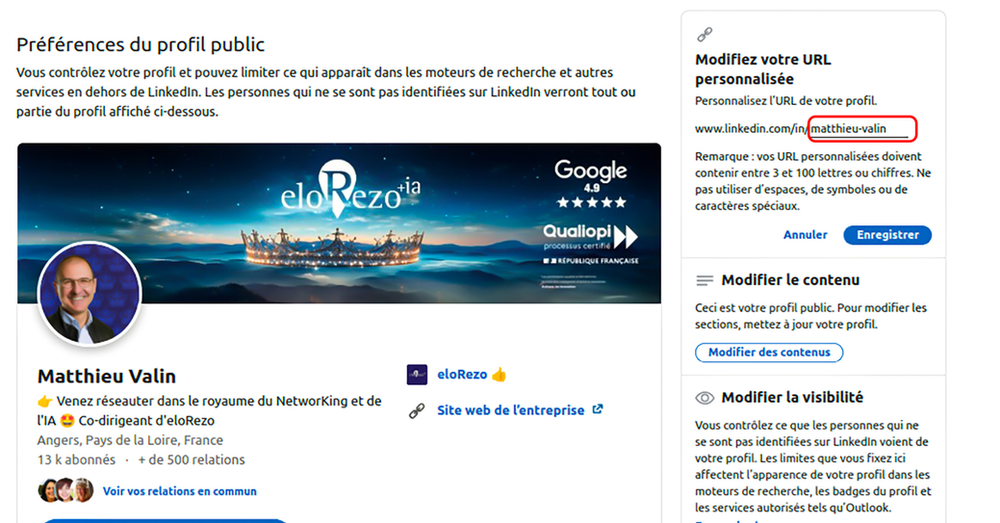
Have you thought about customizing the URL of your LinkedIn profile? By default, LinkedIn gcreates an unprofessional URL. Make sure you adjust yours for a profile that is more suited to the professional world. If it's not done yet, take the time to do it right now.
The steps to customize the URL link of your LinkedIn profile
1) Click on the icon "You", located at the top of your LinkedIn homepage, then on "See profile"
2) At the top right of your screen, you will find "Public profile & URL", click on the pencil icon.
3) Edit URL link for the public profile in the text box. If it is not available, it's that it is already used It's up to you to choose a simple name.
4) Click on "Save" to validate your new custom URL.
Why customize the URL of your LinkedIn profile?
As they always say, "The devil is in the details." Generally composed of first name, surname, numbers and letters, the default URL link is unsightly and is not very professional. Personalization of the product is therefore essential for:
Make it easier to memorize
A custom URL makes your LinkedIn profile more professional and memorable. Instead of a random URL consisting of numbers and letters, you get a clean address, easy to share, write and memorize. This strengthens your personal brand image.
Improving your visibility
By customizing your profile URL, you enhance your visibility on social media. More specifically, when a recruiter or client wishes to learn more about you, he or she will tend to Search your name on Google. Your profile will be visible in its results if your name is embedded in the custom URL.
Facilitate sharing
When you customize your LinkedIn URL, it becomes more user-friendly for sharing on your CV, business cards, emails, or other professional networking platforms. People may access your LinkedIn profile directly by simply clicking on the link.
Improving SEO
Customizing your LinkedIn URL can have a positive impact on your SEO. Search engines like Google index LinkedIn. A custom URL containing your name can help make you appear in the search results when someone searches for your name.
Some attractive LinkedIn URLs ideas
- Full name
- Surname and first name + title of your trade
- Surname and first name + company name
- Full name + business line
- Name of trade mark
Some rules to follow to change the URL of your LinkedIn profile
- Your custom URL must contain 3 to 100 characters
- Spaces, commas, symbols, special characters, or the word "LinkedIn" should be excluded.
- The URL can only be changed up to five times in six months.
There you go. You have all the cards in hand to edit and customize your LinkedIn URL link. It's your turn!
And for more tips subscribe to our Newsletter: https://zcmp.eu/85Nc 👍